<?xml version="1.0" encoding="utf-8"?><?xml-stylesheet type="text/xsl" href="atom.xsl"?>
<feed xmlns="http://www.w3.org/2005/Atom">
    <id>https://sophiedeziel.github.io/blog</id>
    <title>Code &amp; Chaos Blog</title>
    <updated>2026-04-03T00:00:00.000Z</updated>
    <generator>https://github.com/jpmonette/feed</generator>
    <link rel="alternate" href="https://sophiedeziel.github.io/blog"/>
    <subtitle>Code &amp; Chaos Blog</subtitle>
    <icon>https://sophiedeziel.github.io/img/logo.svg</icon>
    <entry>
        <title type="html"><![CDATA[Hello World on a cheap Aliexpress ESP8266 Display]]></title>
        <id>https://sophiedeziel.github.io/blog/hello-world-aliexpress-display</id>
        <link href="https://sophiedeziel.github.io/blog/hello-world-aliexpress-display"/>
        <updated>2026-04-03T00:00:00.000Z</updated>
        <summary type="html"><![CDATA[I bought this tiny yellow cube off Aliexpress for about $18 (canadian monopoly dollars). There was no documentation, and no instructions on the listing. There was just a photo and a very short description containing "development board". Obviously, I had to figure out how to make it do something. That's the type of gambling I do.]]></summary>
        <content type="html"><![CDATA[<p>I bought this tiny yellow cube off Aliexpress for about $18 (canadian monopoly dollars). There was no documentation, and no instructions on the listing. There was just a photo and a very short description containing "development board". Obviously, I had to figure out how to make it do something. That's the type of gambling I do.</p>
<h2 class="anchor anchorTargetStickyNavbar_Vzrq" id="quick-recap">Quick recap<a href="https://sophiedeziel.github.io/blog/hello-world-aliexpress-display#quick-recap" class="hash-link" aria-label="Direct link to Quick recap" title="Direct link to Quick recap" translate="no">​</a></h2>
<p>In my <a class="" href="https://sophiedeziel.github.io/blog/cheap-and-cute-aliexpress-display">previous post</a>, I tore the thing apart and identified what's inside:</p>
<ul>
<li class="">An <strong>ESP-12S</strong> module (ESP8266 with 4MB flash and WiFi)</li>
<li class="">A <strong>1.54" 240x240 IPS LCD</strong> driven by an <strong>ST7789</strong> controller over SPI</li>
<li class="">A <strong>CH340K</strong> USB-to-serial chip for programming</li>
<li class="">The board is helpfully labeled <strong>"ESP 1.54-LCD v1.0"</strong></li>
</ul>
<p>The pin mapping for the display (which I figured out by tracing the PCB) is:</p>
<table><thead><tr><th>Function</th><th>GPIO</th></tr></thead><tbody><tr><td>MOSI</td><td>13</td></tr><tr><td>SCLK</td><td>14</td></tr><tr><td>CS</td><td>15</td></tr><tr><td>DC</td><td>2</td></tr><tr><td>RST</td><td>0</td></tr></tbody></table>
<p>Now let's actually make it do something.</p>
<h2 class="anchor anchorTargetStickyNavbar_Vzrq" id="installing-the-driver">Installing the driver<a href="https://sophiedeziel.github.io/blog/hello-world-aliexpress-display#installing-the-driver" class="hash-link" aria-label="Direct link to Installing the driver" title="Direct link to Installing the driver" translate="no">​</a></h2>
<p>The CH340K needs a driver on macOS. Download it from the <a href="https://github.com/WCHSoftGroup/ch34xser_macos" target="_blank" rel="noopener noreferrer" class="">WCH github</a> and install it.</p>
<p>Here's the gotcha: after installing, macOS blocks the system extension until you manually approve it. It took me a while to figure out why I could not connect to my device until some googling gave me the answer. Go to <strong>System Settings &gt; General &gt; Login Items &amp; Extensions &gt; Driver Extensions</strong> and allow it. You can verify it's active with:</p>
<div class="language-bash codeBlockContainer_Ckt0 theme-code-block" style="--prism-color:#393A34;--prism-background-color:#f6f8fa"><div class="codeBlockContent_QJqH"><pre tabindex="0" class="prism-code language-bash codeBlock_bY9V thin-scrollbar" style="color:#393A34;background-color:#f6f8fa"><code class="codeBlockLines_e6Vv"><span class="token-line" style="color:#393A34"><span class="token plain">systemextensionsctl list</span><br></span></code></pre></div></div>
<p>Once approved, plug the board in and check:</p>
<div class="language-bash codeBlockContainer_Ckt0 theme-code-block" style="--prism-color:#393A34;--prism-background-color:#f6f8fa"><div class="codeBlockContent_QJqH"><pre tabindex="0" class="prism-code language-bash codeBlock_bY9V thin-scrollbar" style="color:#393A34;background-color:#f6f8fa"><code class="codeBlockLines_e6Vv"><span class="token-line" style="color:#393A34"><span class="token plain">ls /dev/cu.wchusbserial*</span><br></span></code></pre></div></div>
<p>You should see something like <code>/dev/cu.wchusbserial21310</code>.</p>
<h2 class="anchor anchorTargetStickyNavbar_Vzrq" id="setting-up-platformio">Setting up PlatformIO<a href="https://sophiedeziel.github.io/blog/hello-world-aliexpress-display#setting-up-platformio" class="hash-link" aria-label="Direct link to Setting up PlatformIO" title="Direct link to Setting up PlatformIO" translate="no">​</a></h2>
<p>I'm using <a href="https://platformio.org/" target="_blank" rel="noopener noreferrer" class="">PlatformIO</a> to build and flash. Install it with:</p>
<div class="language-bash codeBlockContainer_Ckt0 theme-code-block" style="--prism-color:#393A34;--prism-background-color:#f6f8fa"><div class="codeBlockContent_QJqH"><pre tabindex="0" class="prism-code language-bash codeBlock_bY9V thin-scrollbar" style="color:#393A34;background-color:#f6f8fa"><code class="codeBlockLines_e6Vv"><span class="token-line" style="color:#393A34"><span class="token plain">brew install platformio</span><br></span></code></pre></div></div>
<p>Create a new project:</p>
<div class="language-bash codeBlockContainer_Ckt0 theme-code-block" style="--prism-color:#393A34;--prism-background-color:#f6f8fa"><div class="codeBlockContent_QJqH"><pre tabindex="0" class="prism-code language-bash codeBlock_bY9V thin-scrollbar" style="color:#393A34;background-color:#f6f8fa"><code class="codeBlockLines_e6Vv"><span class="token-line" style="color:#393A34"><span class="token plain">mkdir hello-display &amp;&amp; cd hello-display</span><br></span><span class="token-line" style="color:#393A34"><span class="token plain">pio init --board esp12e</span><br></span></code></pre></div></div>
<p>Now replace the generated <code>platformio.ini</code> with this configuration:</p>
<div class="language-ini codeBlockContainer_Ckt0 theme-code-block" style="--prism-color:#393A34;--prism-background-color:#f6f8fa"><div class="codeBlockContent_QJqH"><pre tabindex="0" class="prism-code language-ini codeBlock_bY9V thin-scrollbar" style="color:#393A34;background-color:#f6f8fa"><code class="codeBlockLines_e6Vv"><span class="token-line" style="color:#393A34"><span class="token plain">[env:esp8266]</span><br></span><span class="token-line" style="color:#393A34"><span class="token plain">platform = espressif8266</span><br></span><span class="token-line" style="color:#393A34"><span class="token plain">board = esp12e</span><br></span><span class="token-line" style="color:#393A34"><span class="token plain">framework = arduino</span><br></span><span class="token-line" style="color:#393A34"><span class="token plain">monitor_speed = 115200</span><br></span><span class="token-line" style="color:#393A34"><span class="token plain">monitor_rts = 0</span><br></span><span class="token-line" style="color:#393A34"><span class="token plain">monitor_dtr = 0</span><br></span><span class="token-line" style="color:#393A34"><span class="token plain">upload_port = /dev/cu.wchusbserial*</span><br></span><span class="token-line" style="color:#393A34"><span class="token plain">monitor_port = /dev/cu.wchusbserial*</span><br></span><span class="token-line" style="color:#393A34"><span class="token plain">lib_deps =</span><br></span><span class="token-line" style="color:#393A34"><span class="token plain">    TFT_eSPI</span><br></span><span class="token-line" style="color:#393A34"><span class="token plain">build_flags =</span><br></span><span class="token-line" style="color:#393A34"><span class="token plain">    -DUSER_SETUP_LOADED=1</span><br></span><span class="token-line" style="color:#393A34"><span class="token plain">    -DST7789_DRIVER=1</span><br></span><span class="token-line" style="color:#393A34"><span class="token plain">    -DTFT_WIDTH=240</span><br></span><span class="token-line" style="color:#393A34"><span class="token plain">    -DTFT_HEIGHT=240</span><br></span><span class="token-line" style="color:#393A34"><span class="token plain">    -DTFT_MISO=-1</span><br></span><span class="token-line" style="color:#393A34"><span class="token plain">    -DTFT_MOSI=13</span><br></span><span class="token-line" style="color:#393A34"><span class="token plain">    -DTFT_SCLK=14</span><br></span><span class="token-line" style="color:#393A34"><span class="token plain">    -DTFT_CS=15</span><br></span><span class="token-line" style="color:#393A34"><span class="token plain">    -DTFT_DC=2</span><br></span><span class="token-line" style="color:#393A34"><span class="token plain">    -DTFT_RST=0</span><br></span><span class="token-line" style="color:#393A34"><span class="token plain">    -DLOAD_GLCD=1</span><br></span><span class="token-line" style="color:#393A34"><span class="token plain">    -DLOAD_FONT2=1</span><br></span><span class="token-line" style="color:#393A34"><span class="token plain">    -DLOAD_FONT4=1</span><br></span><span class="token-line" style="color:#393A34"><span class="token plain">    -DSPI_FREQUENCY=40000000</span><br></span></code></pre></div></div>
<p>A few things to note:</p>
<ul>
<li class=""><strong><code>USER_SETUP_LOADED=1</code></strong> tells TFT_eSPI to skip its own config file and use our build flags instead. This is way cleaner than editing the library's <code>User_Setup.h</code>.</li>
<li class=""><strong><code>monitor_rts = 0</code> and <code>monitor_dtr = 0</code></strong> prevent the serial monitor from resetting the board every time you connect. The CH340K's DTR/RTS lines trigger a reset by default, which is super annoying when you're just trying to watch logs.</li>
<li class="">The pin numbers match the board's SPI wiring to the ST7789 display.</li>
</ul>
<h2 class="anchor anchorTargetStickyNavbar_Vzrq" id="the-firmware">The firmware<a href="https://sophiedeziel.github.io/blog/hello-world-aliexpress-display#the-firmware" class="hash-link" aria-label="Direct link to The firmware" title="Direct link to The firmware" translate="no">​</a></h2>
<p>Create <code>src/main.cpp</code>:</p>
<div class="language-cpp codeBlockContainer_Ckt0 theme-code-block" style="--prism-color:#393A34;--prism-background-color:#f6f8fa"><div class="codeBlockContent_QJqH"><pre tabindex="0" class="prism-code language-cpp codeBlock_bY9V thin-scrollbar" style="color:#393A34;background-color:#f6f8fa"><code class="codeBlockLines_e6Vv"><span class="token-line" style="color:#393A34"><span class="token macro property directive-hash" style="color:#36acaa">#</span><span class="token macro property directive keyword" style="color:#00009f">include</span><span class="token macro property" style="color:#36acaa"> </span><span class="token macro property string" style="color:#e3116c">&lt;Arduino.h&gt;</span><span class="token plain"></span><br></span><span class="token-line" style="color:#393A34"><span class="token plain"></span><span class="token macro property directive-hash" style="color:#36acaa">#</span><span class="token macro property directive keyword" style="color:#00009f">include</span><span class="token macro property" style="color:#36acaa"> </span><span class="token macro property string" style="color:#e3116c">&lt;TFT_eSPI.h&gt;</span><span class="token plain"></span><br></span><span class="token-line" style="color:#393A34"><span class="token plain" style="display:inline-block"></span><br></span><span class="token-line" style="color:#393A34"><span class="token plain">TFT_eSPI tft </span><span class="token operator" style="color:#393A34">=</span><span class="token plain"> </span><span class="token function" style="color:#d73a49">TFT_eSPI</span><span class="token punctuation" style="color:#393A34">(</span><span class="token punctuation" style="color:#393A34">)</span><span class="token punctuation" style="color:#393A34">;</span><span class="token plain"></span><br></span><span class="token-line" style="color:#393A34"><span class="token plain" style="display:inline-block"></span><br></span><span class="token-line" style="color:#393A34"><span class="token plain"></span><span class="token keyword" style="color:#00009f">void</span><span class="token plain"> </span><span class="token function" style="color:#d73a49">setup</span><span class="token punctuation" style="color:#393A34">(</span><span class="token punctuation" style="color:#393A34">)</span><span class="token plain"> </span><span class="token punctuation" style="color:#393A34">{</span><span class="token plain"></span><br></span><span class="token-line" style="color:#393A34"><span class="token plain">    Serial</span><span class="token punctuation" style="color:#393A34">.</span><span class="token function" style="color:#d73a49">begin</span><span class="token punctuation" style="color:#393A34">(</span><span class="token number" style="color:#36acaa">115200</span><span class="token punctuation" style="color:#393A34">)</span><span class="token punctuation" style="color:#393A34">;</span><span class="token plain"></span><br></span><span class="token-line" style="color:#393A34"><span class="token plain">    Serial</span><span class="token punctuation" style="color:#393A34">.</span><span class="token function" style="color:#d73a49">println</span><span class="token punctuation" style="color:#393A34">(</span><span class="token string" style="color:#e3116c">"Hello World!"</span><span class="token punctuation" style="color:#393A34">)</span><span class="token punctuation" style="color:#393A34">;</span><span class="token plain"></span><br></span><span class="token-line" style="color:#393A34"><span class="token plain" style="display:inline-block"></span><br></span><span class="token-line" style="color:#393A34"><span class="token plain">    tft</span><span class="token punctuation" style="color:#393A34">.</span><span class="token function" style="color:#d73a49">init</span><span class="token punctuation" style="color:#393A34">(</span><span class="token punctuation" style="color:#393A34">)</span><span class="token punctuation" style="color:#393A34">;</span><span class="token plain"></span><br></span><span class="token-line" style="color:#393A34"><span class="token plain">    tft</span><span class="token punctuation" style="color:#393A34">.</span><span class="token function" style="color:#d73a49">setRotation</span><span class="token punctuation" style="color:#393A34">(</span><span class="token number" style="color:#36acaa">0</span><span class="token punctuation" style="color:#393A34">)</span><span class="token punctuation" style="color:#393A34">;</span><span class="token plain"></span><br></span><span class="token-line" style="color:#393A34"><span class="token plain">    tft</span><span class="token punctuation" style="color:#393A34">.</span><span class="token function" style="color:#d73a49">fillScreen</span><span class="token punctuation" style="color:#393A34">(</span><span class="token plain">TFT_BLACK</span><span class="token punctuation" style="color:#393A34">)</span><span class="token punctuation" style="color:#393A34">;</span><span class="token plain"></span><br></span><span class="token-line" style="color:#393A34"><span class="token plain">    tft</span><span class="token punctuation" style="color:#393A34">.</span><span class="token function" style="color:#d73a49">setTextColor</span><span class="token punctuation" style="color:#393A34">(</span><span class="token plain">TFT_WHITE</span><span class="token punctuation" style="color:#393A34">,</span><span class="token plain"> TFT_BLACK</span><span class="token punctuation" style="color:#393A34">)</span><span class="token punctuation" style="color:#393A34">;</span><span class="token plain"></span><br></span><span class="token-line" style="color:#393A34"><span class="token plain">    tft</span><span class="token punctuation" style="color:#393A34">.</span><span class="token function" style="color:#d73a49">setTextSize</span><span class="token punctuation" style="color:#393A34">(</span><span class="token number" style="color:#36acaa">2</span><span class="token punctuation" style="color:#393A34">)</span><span class="token punctuation" style="color:#393A34">;</span><span class="token plain"></span><br></span><span class="token-line" style="color:#393A34"><span class="token plain">    tft</span><span class="token punctuation" style="color:#393A34">.</span><span class="token function" style="color:#d73a49">setCursor</span><span class="token punctuation" style="color:#393A34">(</span><span class="token number" style="color:#36acaa">40</span><span class="token punctuation" style="color:#393A34">,</span><span class="token plain"> </span><span class="token number" style="color:#36acaa">100</span><span class="token punctuation" style="color:#393A34">)</span><span class="token punctuation" style="color:#393A34">;</span><span class="token plain"></span><br></span><span class="token-line" style="color:#393A34"><span class="token plain">    tft</span><span class="token punctuation" style="color:#393A34">.</span><span class="token function" style="color:#d73a49">println</span><span class="token punctuation" style="color:#393A34">(</span><span class="token string" style="color:#e3116c">"Hello World!"</span><span class="token punctuation" style="color:#393A34">)</span><span class="token punctuation" style="color:#393A34">;</span><span class="token plain"></span><br></span><span class="token-line" style="color:#393A34"><span class="token plain"></span><span class="token punctuation" style="color:#393A34">}</span><span class="token plain"></span><br></span><span class="token-line" style="color:#393A34"><span class="token plain" style="display:inline-block"></span><br></span><span class="token-line" style="color:#393A34"><span class="token plain"></span><span class="token keyword" style="color:#00009f">void</span><span class="token plain"> </span><span class="token function" style="color:#d73a49">loop</span><span class="token punctuation" style="color:#393A34">(</span><span class="token punctuation" style="color:#393A34">)</span><span class="token plain"> </span><span class="token punctuation" style="color:#393A34">{</span><span class="token plain"></span><br></span><span class="token-line" style="color:#393A34"><span class="token plain"></span><span class="token punctuation" style="color:#393A34">}</span><br></span></code></pre></div></div>
<h2 class="anchor anchorTargetStickyNavbar_Vzrq" id="flash-it">Flash it<a href="https://sophiedeziel.github.io/blog/hello-world-aliexpress-display#flash-it" class="hash-link" aria-label="Direct link to Flash it" title="Direct link to Flash it" translate="no">​</a></h2>
<div class="language-bash codeBlockContainer_Ckt0 theme-code-block" style="--prism-color:#393A34;--prism-background-color:#f6f8fa"><div class="codeBlockContent_QJqH"><pre tabindex="0" class="prism-code language-bash codeBlock_bY9V thin-scrollbar" style="color:#393A34;background-color:#f6f8fa"><code class="codeBlockLines_e6Vv"><span class="token-line" style="color:#393A34"><span class="token plain">pio run -t upload</span><br></span></code></pre></div></div>
<p>PlatformIO will download the ESP8266 toolchain and the TFT_eSPI library automatically on the first run. After that, it compiles and flashes over USB.</p>
<p>If the upload fails with a serial port error, make sure:</p>
<ol>
<li class="">The serial monitor isn't running (it holds the port)</li>
<li class="">The USB cable is plugged in (not just charging — some cables are power-only)</li>
<li class="">The CH340K driver is actually approved (check System Settings)</li>
</ol>
<h2 class="anchor anchorTargetStickyNavbar_Vzrq" id="it-works">It works!<a href="https://sophiedeziel.github.io/blog/hello-world-aliexpress-display#it-works" class="hash-link" aria-label="Direct link to It works!" title="Direct link to It works!" translate="no">​</a></h2>
<p>You should see "Hello World!" on the screen. Now, the sky is the limit.</p>
<p>After some research, I found that many versions of that kind of device exist, for a similar price tag. Some of them are using an ESP-32 and
a touch button on top. They sell for about $25 (canadian dollars) right now. I am considering getting one to get bluetooth and at least some
way to turn on/off the screen or have some controls. Maybe I'll create a small solar panel and battery level monitor for our camper van since
there's an open API I can use to get readings with a bluetooth connection.</p>]]></content>
        <author>
            <name>Sophie Déziel</name>
            <uri>https://sophiedeziel.github.io</uri>
        </author>
        <category label="Project Logs" term="Project Logs"/>
        <category label="Tutorials" term="Tutorials"/>
        <category label="Development" term="Development"/>
    </entry>
    <entry>
        <title type="html"><![CDATA[Cheap and Cute AliExpress Display]]></title>
        <id>https://sophiedeziel.github.io/blog/cheap-and-cute-aliexpress-display</id>
        <link href="https://sophiedeziel.github.io/blog/cheap-and-cute-aliexpress-display"/>
        <updated>2026-03-15T00:00:00.000Z</updated>
        <summary type="html"><![CDATA[I love to browse Aliexpress to find random shit. Sometimes, it's just to laugh at the ridiculous products or creative]]></summary>
        <content type="html"><![CDATA[<p>I love to browse Aliexpress to find random shit. Sometimes, it's just to laugh at the ridiculous products or creative
descriptions. Sometimes, I can't resist and buy some stuff to play around with.</p>
<p>I just received a cute display. I don't know yet what I'm going to do with it. The listing did not say much, and I did
not research it a lot. I just impulsively pressed the "add to cart" button and let future (now present) Sophie the pleasure to
discover what's inside.</p>
<p>So, today I'm opening it up to document what's inside. Maybe some ideas will come soon. So far, the best idea I have is to
code a custom and cute desk pet/robot/companion that does nothing useful other than being a cute companion.</p>
<h2 class="anchor anchorTargetStickyNavbar_Vzrq" id="the-outside">The outside<a href="https://sophiedeziel.github.io/blog/cheap-and-cute-aliexpress-display#the-outside" class="hash-link" aria-label="Direct link to The outside" title="Direct link to The outside" translate="no">​</a></h2>
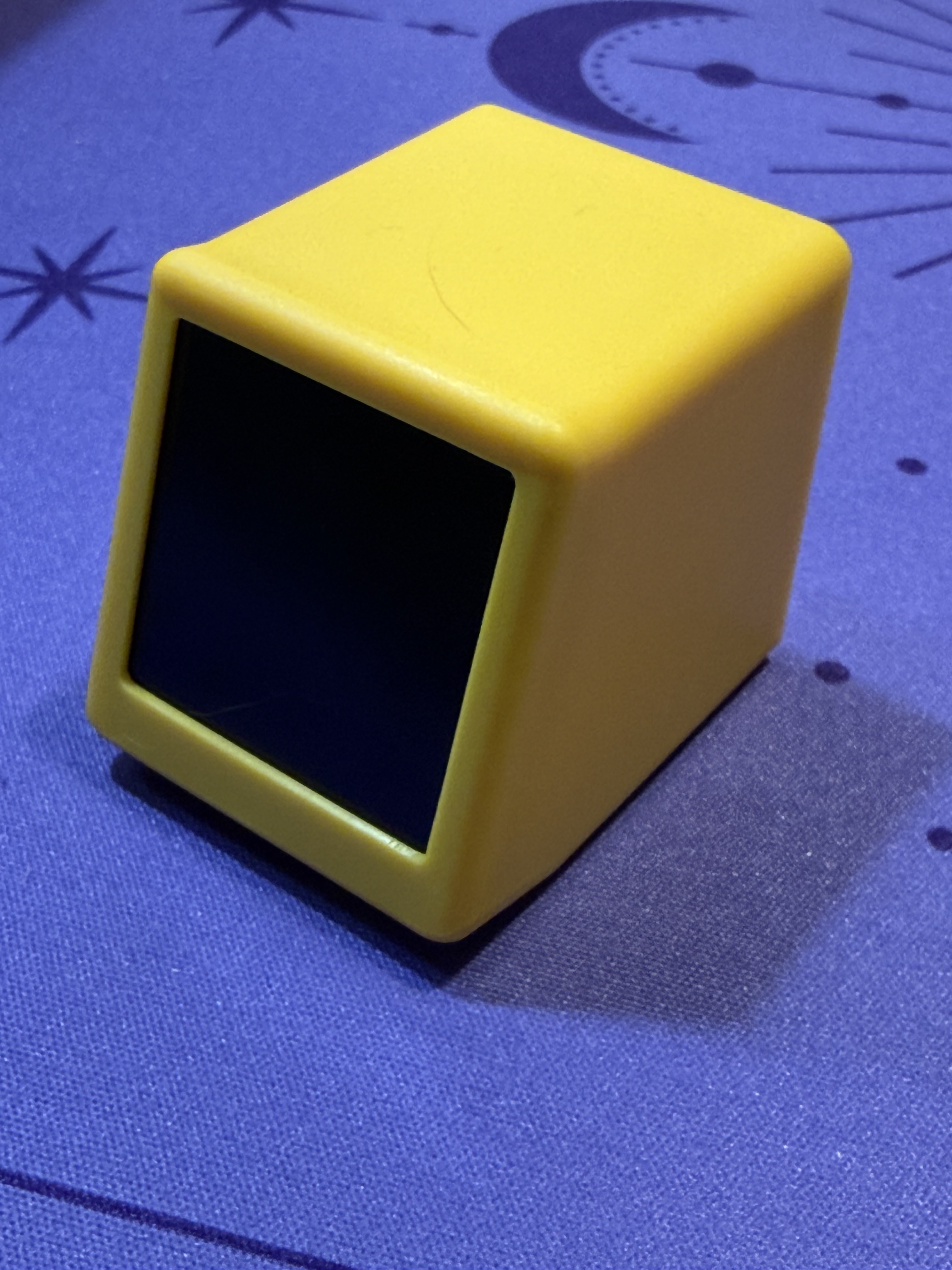
<p>The display from the front, a cute yellow cube with a small dark screen recessed into the top face</p>
<p><img decoding="async" loading="lazy" alt="The display from the front, a cute yellow cube with a small dark screen recessed into the top face" src="https://sophiedeziel.github.io/assets/images/front-screen-743c851ca5f89ed6613446c4d715d930.jpg" width="3024" height="4032" class="img_ev3q"></p>
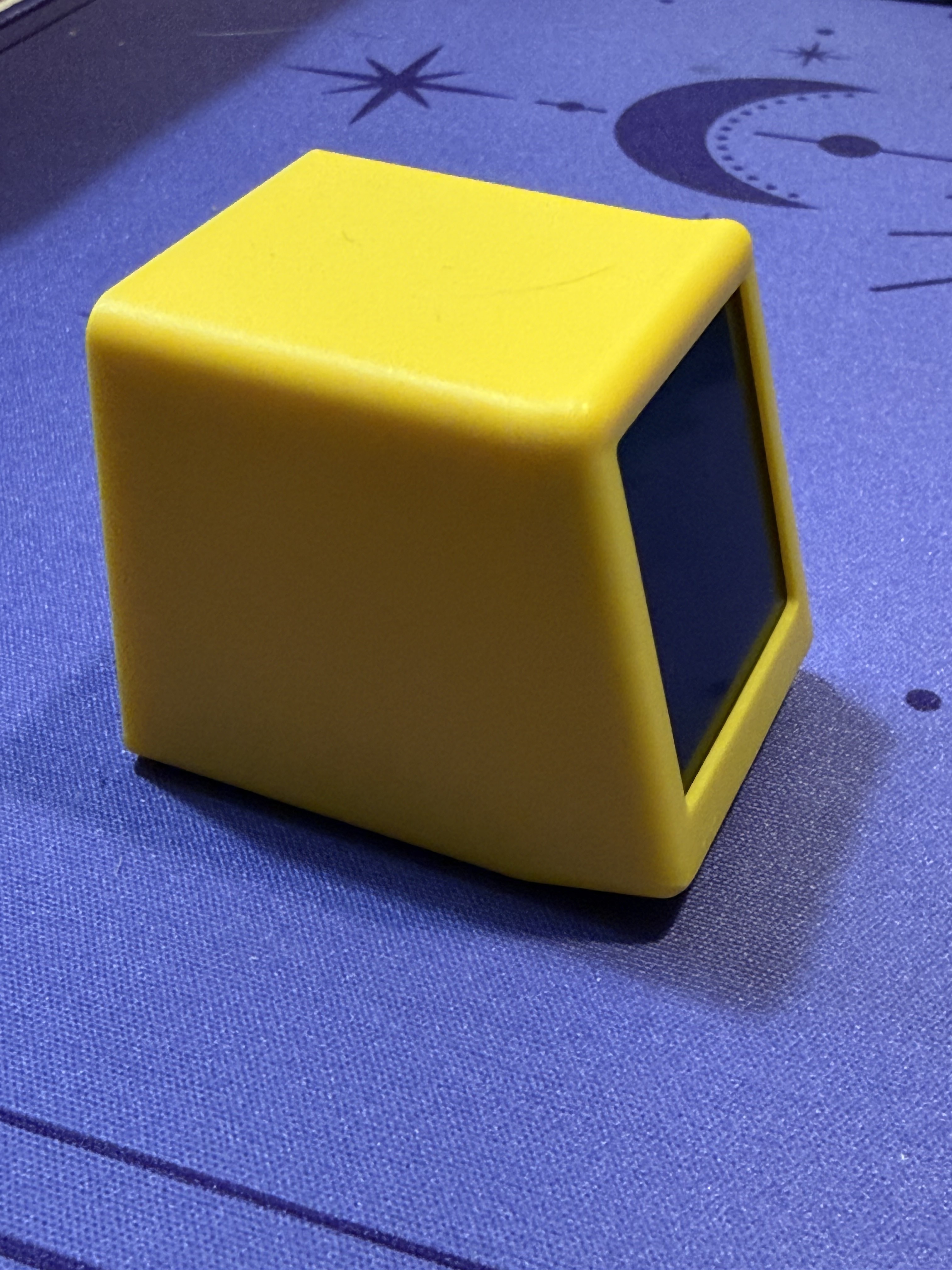
<p><img decoding="async" loading="lazy" alt="Another angle of the yellow cube, showing the front and side" src="https://sophiedeziel.github.io/assets/images/front-angle-1592a4c483d1c3c33c731f782846ade0.jpg" width="3024" height="4032" class="img_ev3q"></p>
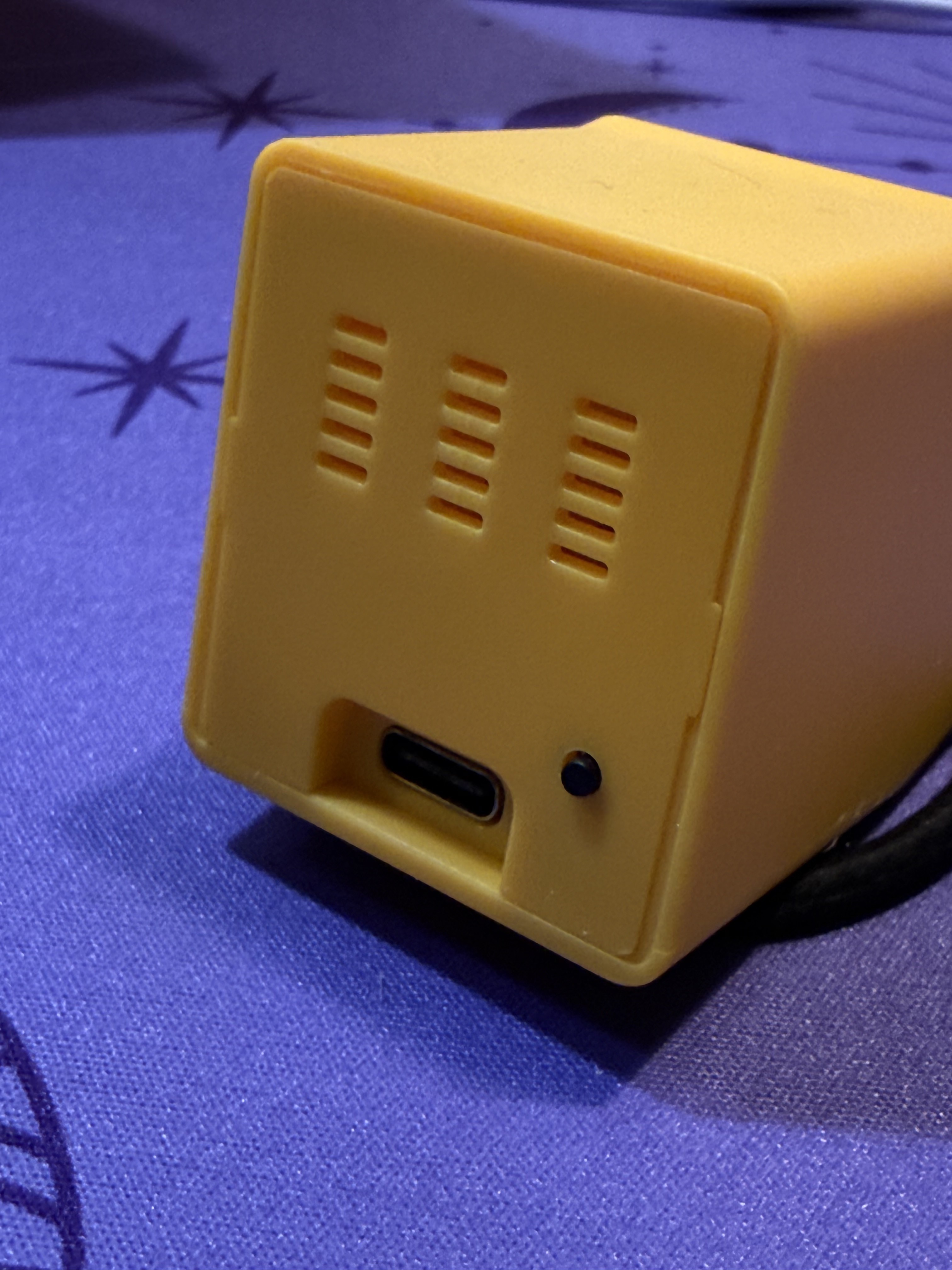
<p>The back of the device showing ventilation slits, a button, and a USB-C port for power</p>
<p><img decoding="async" loading="lazy" alt="The back of the device showing ventilation slits, a button, and a USB-C port for power" src="https://sophiedeziel.github.io/assets/images/back-usbc-vents-ca3541ae67ab68fb2c00ccea85282404.jpg" width="3024" height="4032" class="img_ev3q"></p>
<h2 class="anchor anchorTargetStickyNavbar_Vzrq" id="opening-it-up">Opening it up<a href="https://sophiedeziel.github.io/blog/cheap-and-cute-aliexpress-display#opening-it-up" class="hash-link" aria-label="Direct link to Opening it up" title="Direct link to Opening it up" translate="no">​</a></h2>
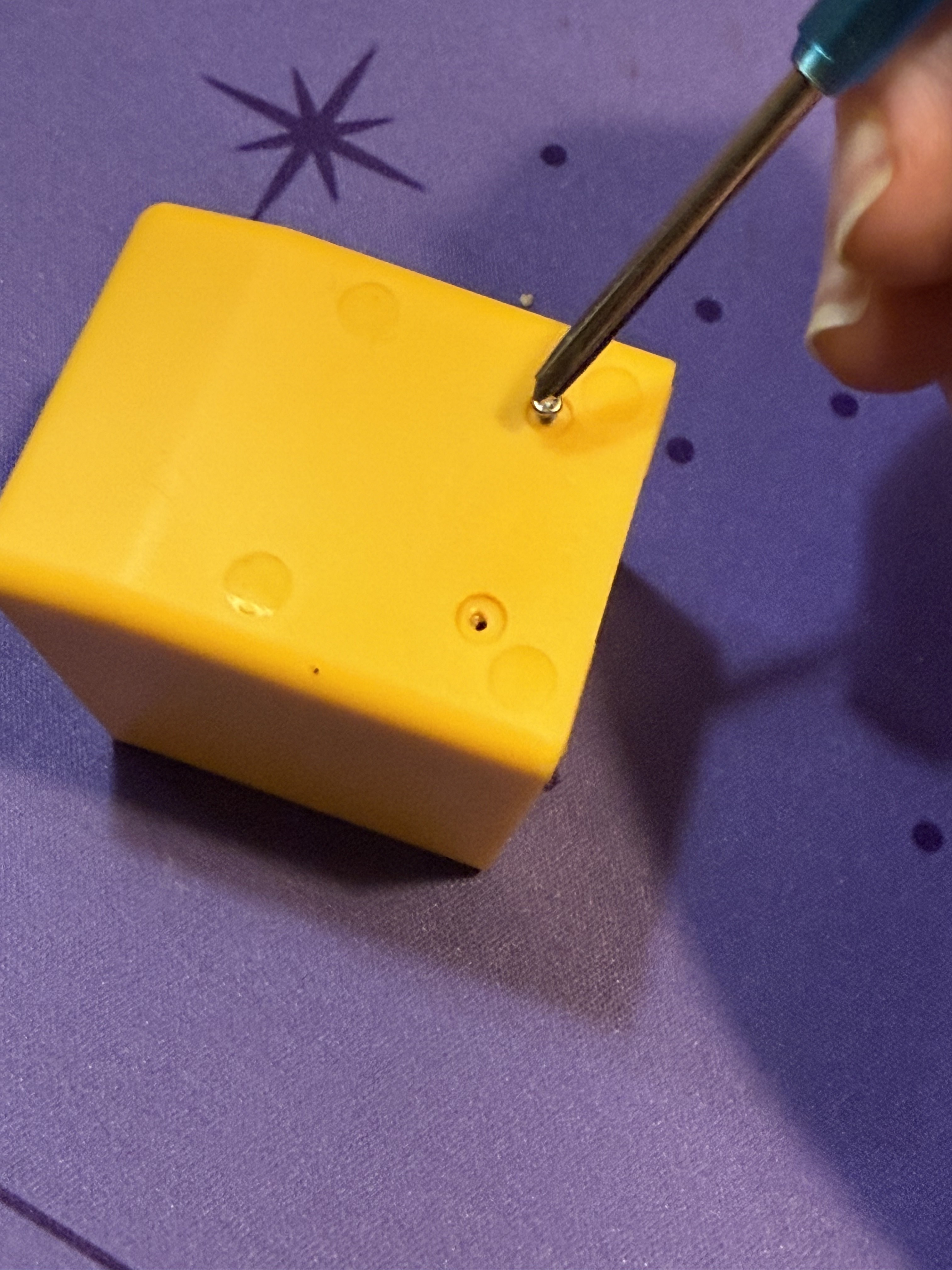
<p><img decoding="async" loading="lazy" alt="Unscrewing the bottom of the yellow case with a small screwdriver, two screw holes visible" src="https://sophiedeziel.github.io/assets/images/unscrewing-bottom-0cf5944637777376344a16cb7d4dfd88.jpg" width="3024" height="4032" class="img_ev3q"></p>
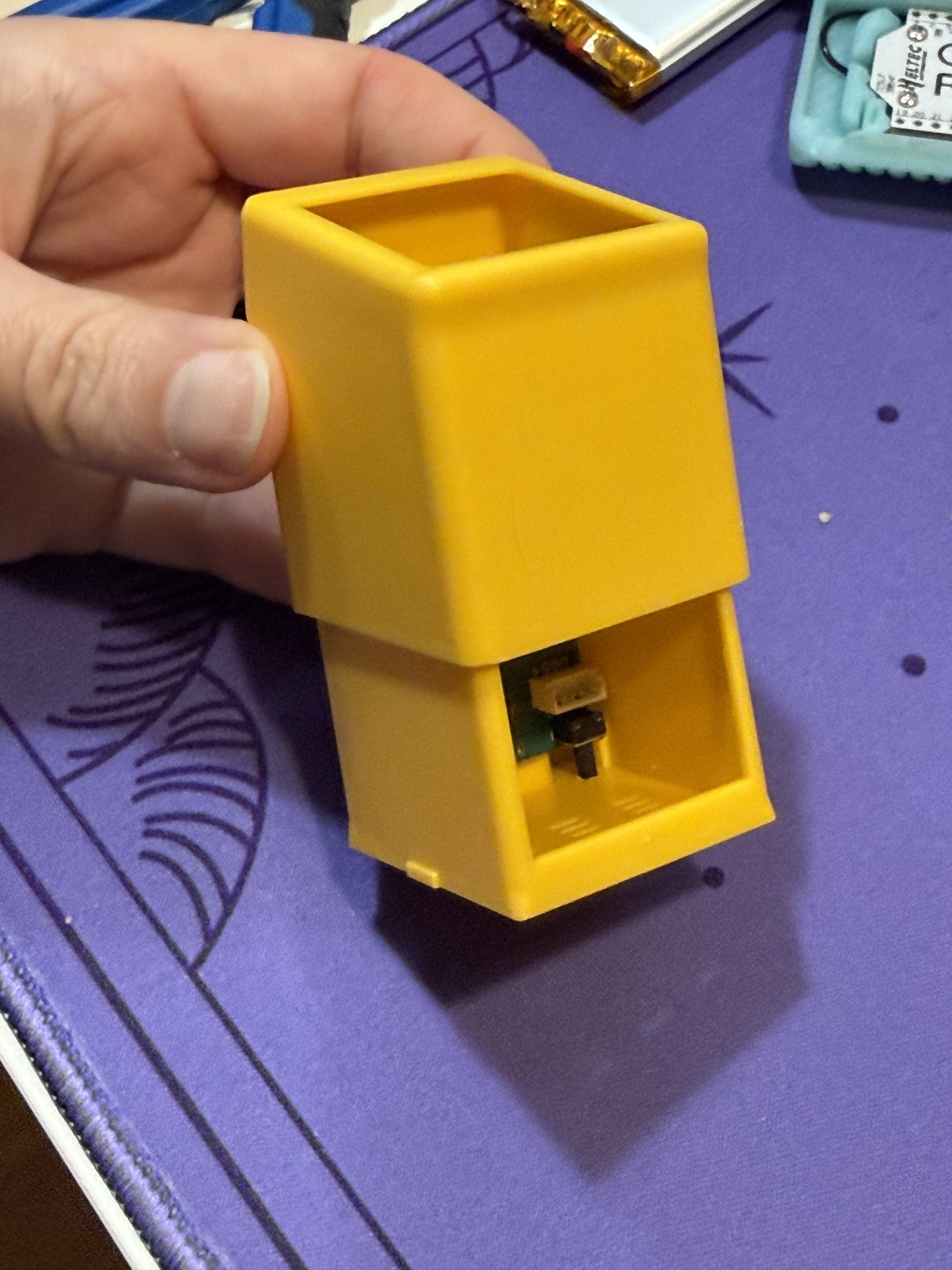
<p>It slides open, and I immediately notice that there is plenty of room to cram some stuff in there if I want to. Maybe I'll add a battery?</p>
<p><img decoding="async" loading="lazy" alt="The case split open" src="https://sophiedeziel.github.io/assets/images/case-open-inside-fbb01e6b630f26a709cfc965b383a204.jpg" width="3024" height="4032" class="img_ev3q"></p>
<h2 class="anchor anchorTargetStickyNavbar_Vzrq" id="the-pcb">The PCB<a href="https://sophiedeziel.github.io/blog/cheap-and-cute-aliexpress-display#the-pcb" class="hash-link" aria-label="Direct link to The PCB" title="Direct link to The PCB" translate="no">​</a></h2>
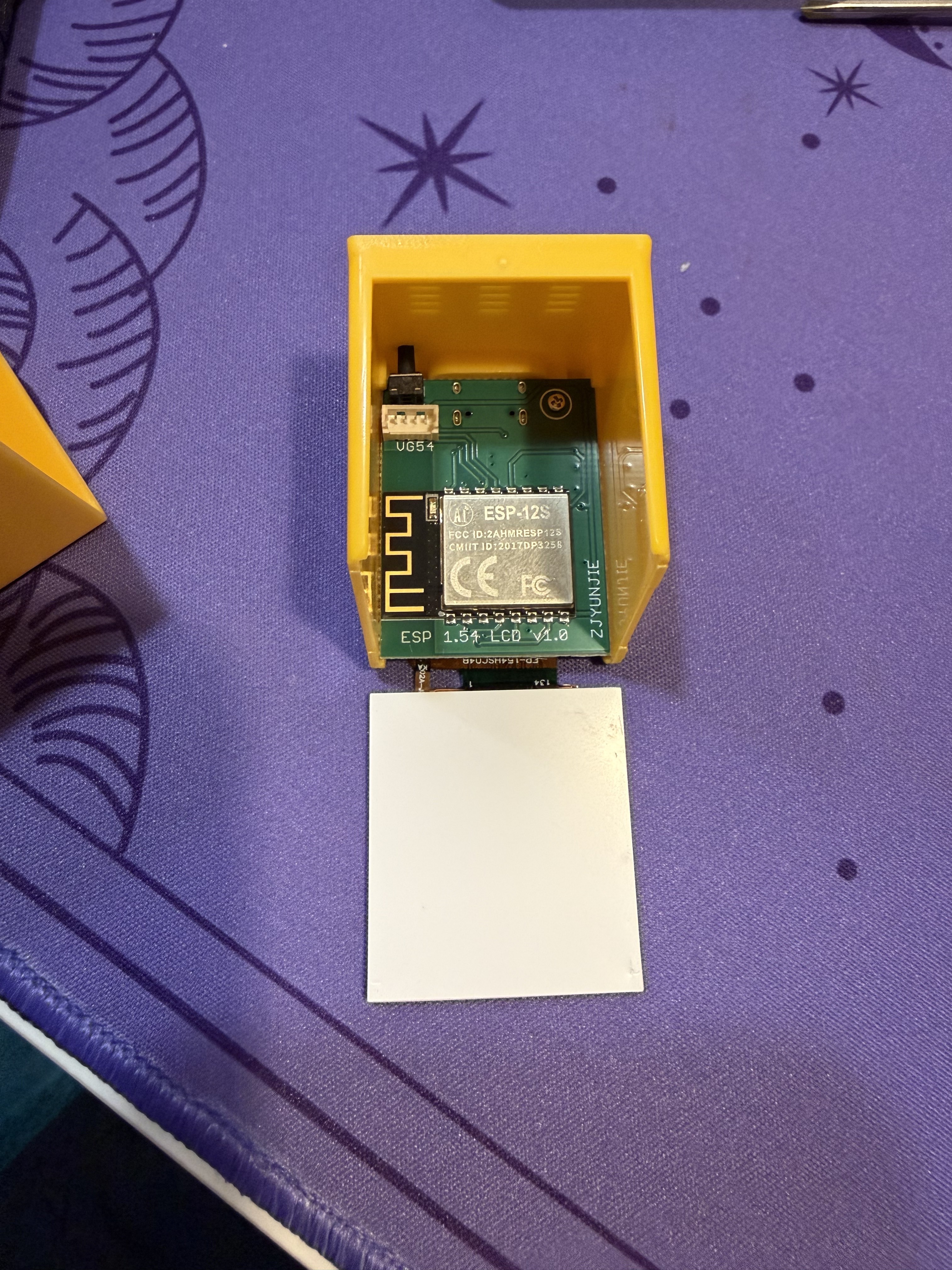
<p>The main PCB slid out of the case, revealing an ESP-12S WiFi module and the board labeled "ESP 1.54 LCD V1.0" by ZJYUNJIE</p>
<p><img decoding="async" loading="lazy" alt="The main PCB slid out of the case, revealing an ESP-12S WiFi module and the board labeled &amp;quot;ESP 1.54 LCD V1.0&amp;quot; by ZJYUNJIE" src="https://sophiedeziel.github.io/assets/images/pcb-esp12s-top-42de6a13471f03348198cff210899b2d.jpg" width="3024" height="4032" class="img_ev3q"></p>
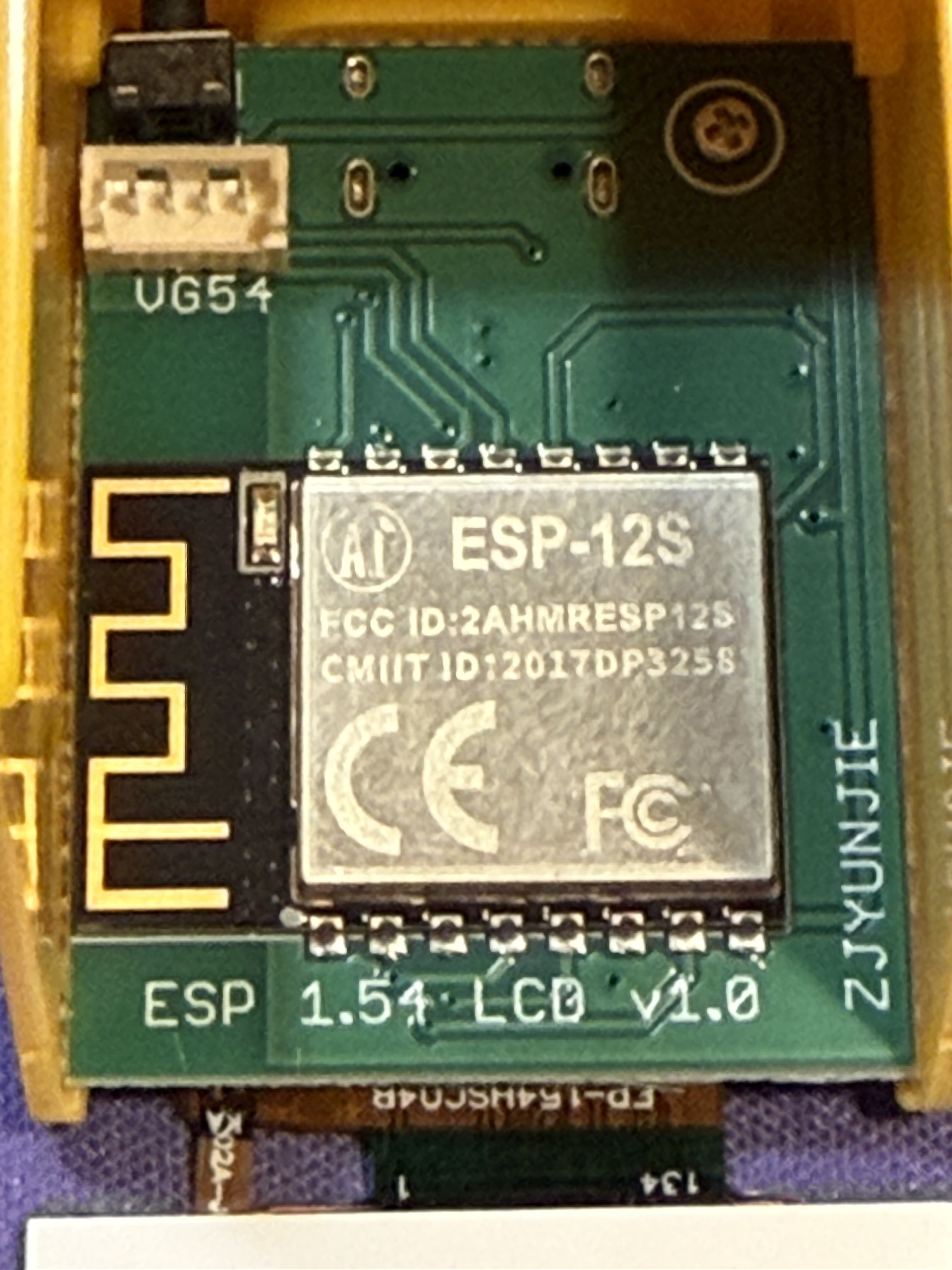
<p>Close-up of the ESP-12S module with its FCC ID (2AHMRESP12S), CE marking, and the PCB antenna.</p>
<p>There's also a 4-pin JST-style connector labeled VG54 on the board. The traces appear to route toward the right side of the ESP-12S, possibly to GPIO14 (SCL) and GPIO12 (SDA) — which would make it an I2C expansion port. A continuity test with a multimeter would confirm it.</p>
<p>I noticed that some listings are mentioning a capacitive touch on the top of the device, but the one I bought does not have that. This is probably where it would be plugged in.</p>
<p><img decoding="async" loading="lazy" alt="Close-up of the ESP-12S module with its FCC ID (2AHMRESP12S), CE marking, and the PCB antenna" src="https://sophiedeziel.github.io/assets/images/esp12s-closeup-1f52b6dc7cefc09887f8a8c1c14bd53f.jpg" width="3024" height="4032" class="img_ev3q"></p>
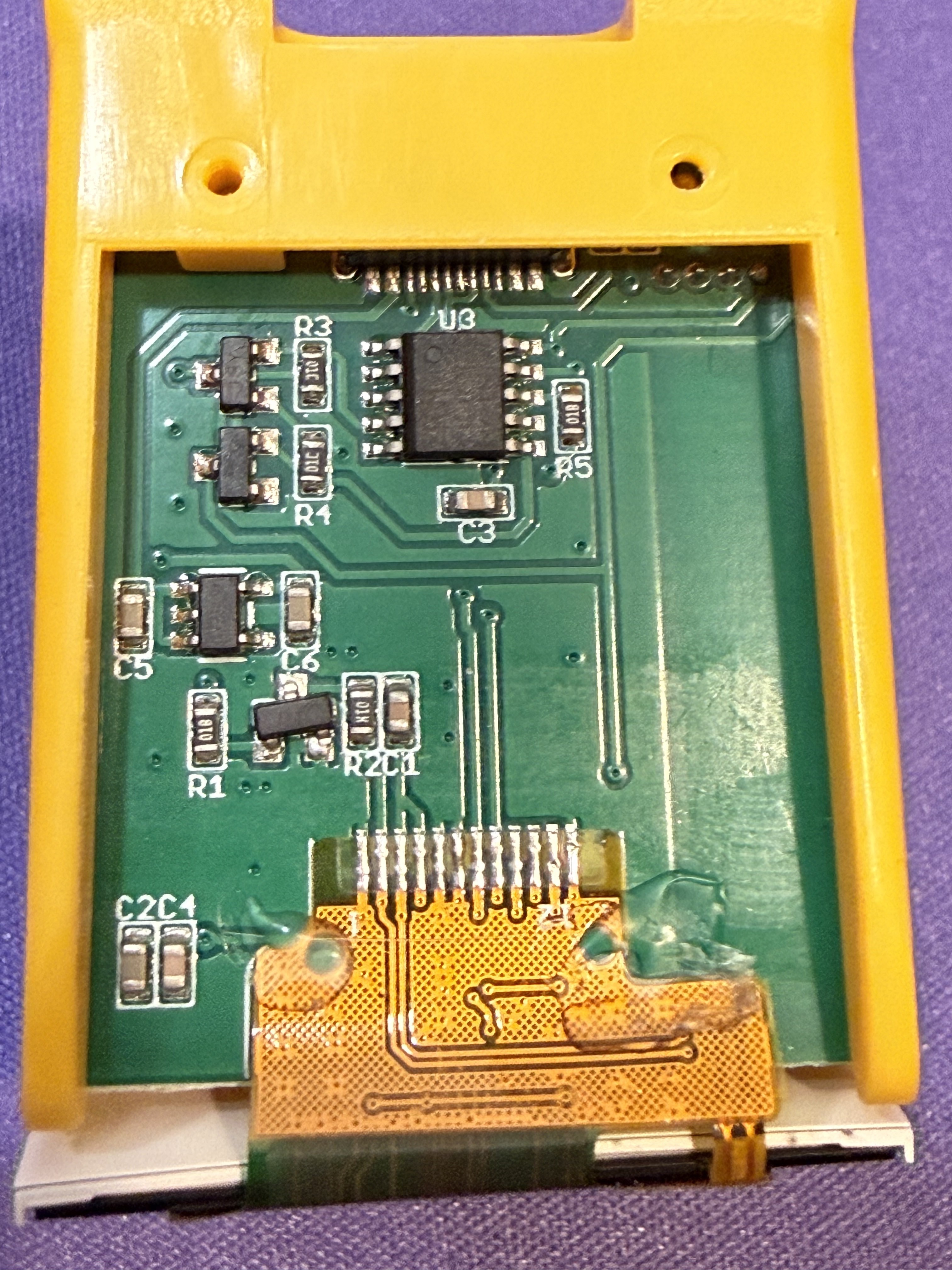
<p>The other side of the PCB showing the display flex cable connector and several surface-mount ICs</p>
<p><img decoding="async" loading="lazy" alt="The other side of the PCB showing the display flex cable connector and several surface-mount ICs" src="https://sophiedeziel.github.io/assets/images/pcb-backside-a2ec8fa26678849e13cdb2a18a250e83.jpg" width="3024" height="4032" class="img_ev3q"></p>
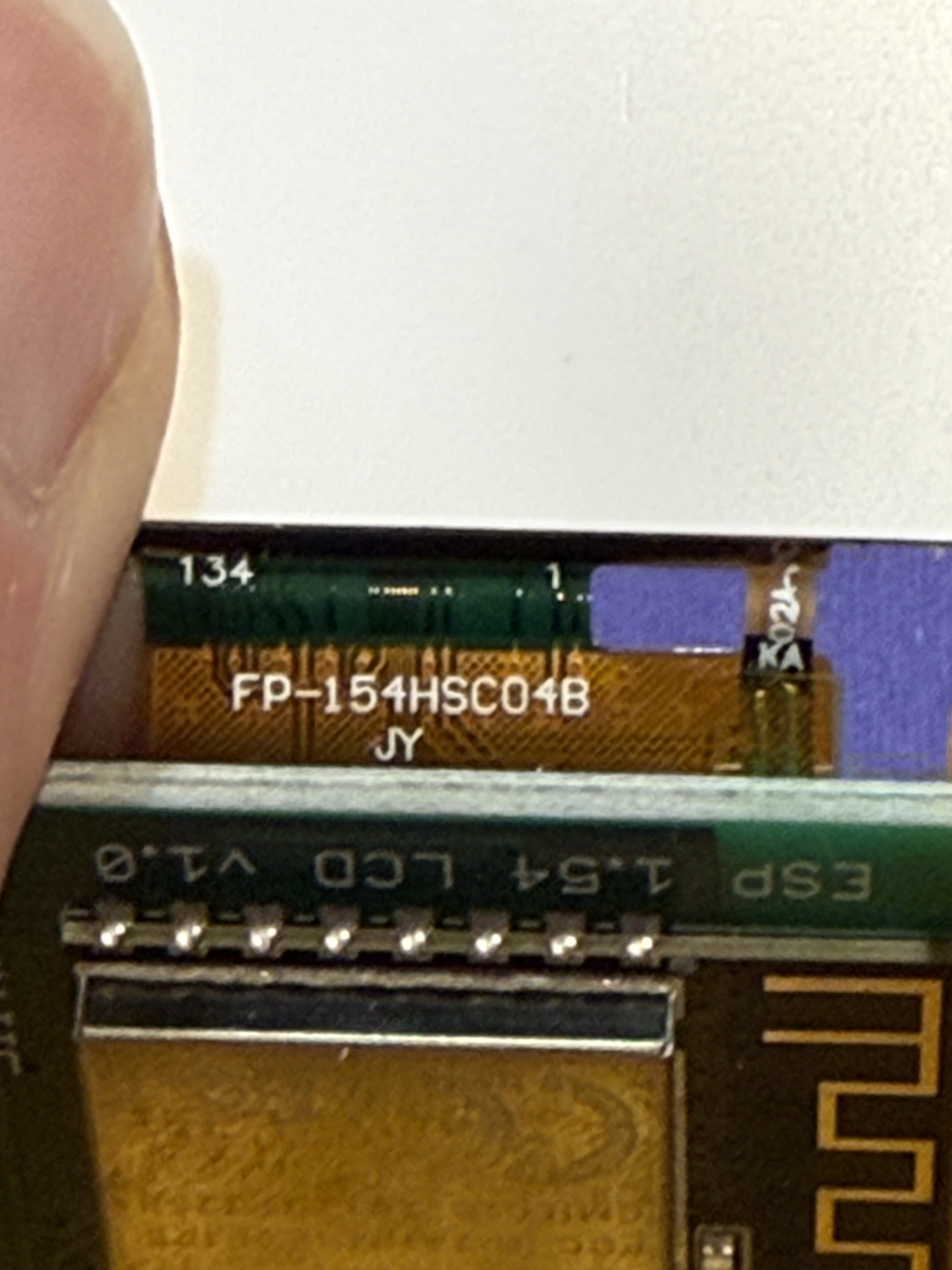
<p>The ribbon cable is marked "FP-154HSC04B" with "JY" underneath. No separate touch controller or extra FPC is present, so this is likely a display-only panel without touch input.</p>
<p><img decoding="async" loading="lazy" alt="Close-up of the ribbon cable showing the part number FP-154HSC04B and the PCB edge labeled ESP 1.54 LCD V1.0" src="https://sophiedeziel.github.io/assets/images/ribbon-cable-closeup-451428af9287fb5afd9e2d30041736b1.jpg" width="3024" height="4032" class="img_ev3q"></p>
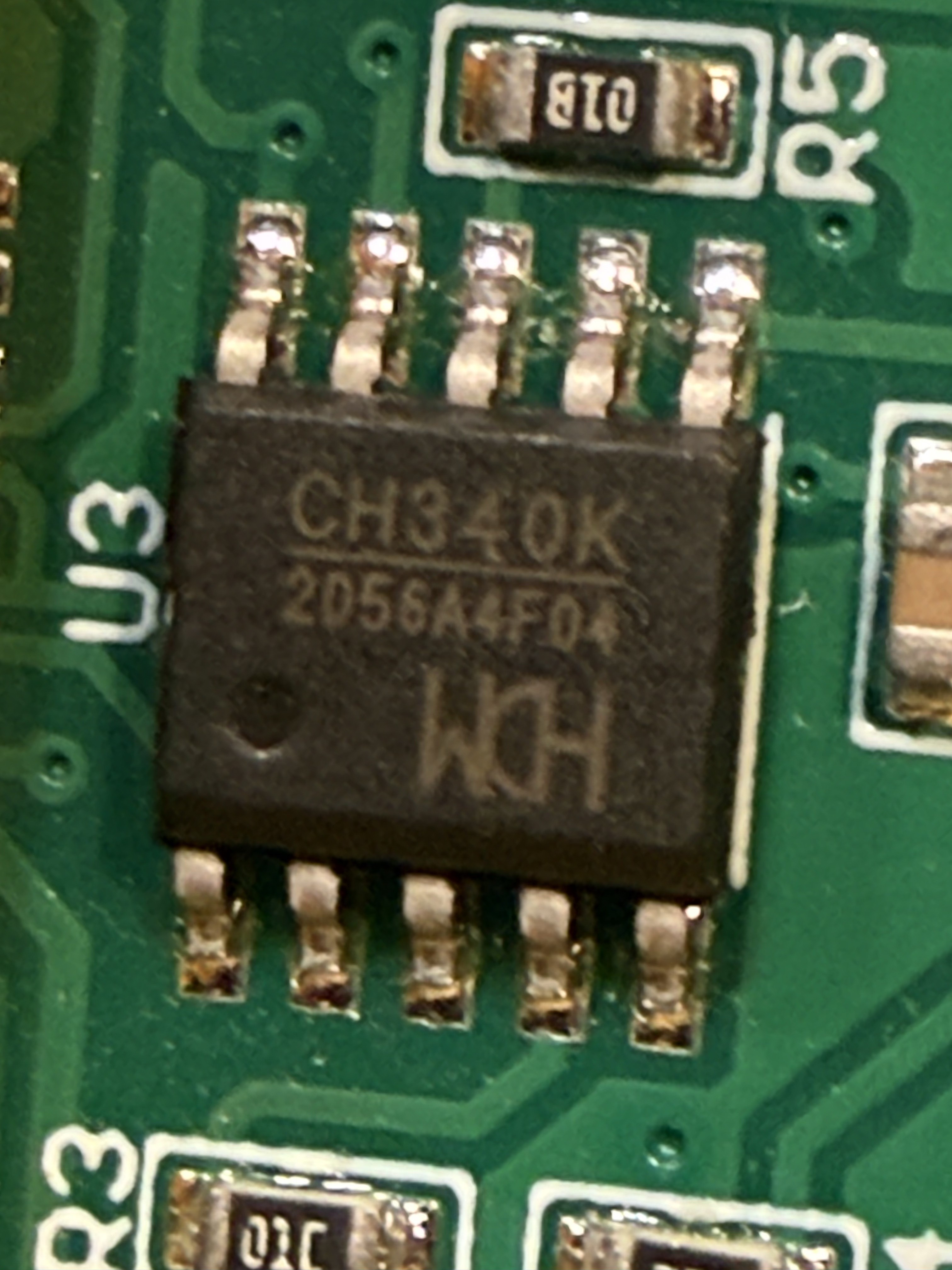
<p>The U3 IC turns out to be a <strong>CH340K</strong> by WCH — a USB-to-serial converter. This means the USB-C port isn't just for power, it's for programming the ESP-12S directly over USB. That is going to make projects easy to flash! <!-- -->:D</p>
<p><img decoding="async" loading="lazy" alt="Close-up of the CH340K USB-to-serial converter IC by WCH" src="https://sophiedeziel.github.io/assets/images/ch340k-closeup-531ebaf0d779ba86967c72c49baad844.jpg" width="3024" height="4032" class="img_ev3q"></p>
<h2 class="anchor anchorTargetStickyNavbar_Vzrq" id="notes-for-future-self">Notes for future self<a href="https://sophiedeziel.github.io/blog/cheap-and-cute-aliexpress-display#notes-for-future-self" class="hash-link" aria-label="Direct link to Notes for future self" title="Direct link to Notes for future self" translate="no">​</a></h2>
<h3 class="anchor anchorTargetStickyNavbar_Vzrq" id="the-esp-12s">The ESP-12S<a href="https://sophiedeziel.github.io/blog/cheap-and-cute-aliexpress-display#the-esp-12s" class="hash-link" aria-label="Direct link to The ESP-12S" title="Direct link to The ESP-12S" translate="no">​</a></h3>
<p>I used the ESP8266 and ESP32 in many projects in the past, and attempted to do something useful with the tiny but very limited ESP-01. It's the first time I get to play with an ESP-12S, which is actually an ESP8266 in a specific module packaging with a built-in PCB antenna and 4MB flash.</p>
<p>As opposed to the good ol' ESP32 I know pretty well now, the ESP-12S has</p>
<ul>
<li class="">No bluetooth</li>
<li class="">Less powerful CPU</li>
<li class="">A lot less RAM</li>
<li class="">Fewer GPIO</li>
<li class="">A lot cheaper</li>
<li class="">Consumes a lot less current</li>
</ul>
<p>So it makes a good low power and cheap alternative for simple projects.</p>
<h3 class="anchor anchorTargetStickyNavbar_Vzrq" id="the-display-module">The display module<a href="https://sophiedeziel.github.io/blog/cheap-and-cute-aliexpress-display#the-display-module" class="hash-link" aria-label="Direct link to The display module" title="Direct link to The display module" translate="no">​</a></h3>
<p>Based on the board label "ESP 1.54 LCD" and the ribbon cable marked "FP-154HSC04B", this is a <strong>1.54" IPS TFT LCD</strong> with a <strong>240x240 resolution</strong> and <strong>65K RGB colors</strong>. These panels are almost always driven by an <strong>ST7789</strong> controller over SPI. No touch capability.</p>]]></content>
        <author>
            <name>Sophie Déziel</name>
            <uri>https://sophiedeziel.github.io</uri>
        </author>
        <category label="reverse-engineering" term="reverse-engineering"/>
        <category label="Project Logs" term="Project Logs"/>
    </entry>
    <entry>
        <title type="html"><![CDATA[TIL: RSpec, RuboCop, AND Cucumber Can All Annotate Your PRs]]></title>
        <id>https://sophiedeziel.github.io/blog/til-github-formatters-trilogy</id>
        <link href="https://sophiedeziel.github.io/blog/til-github-formatters-trilogy"/>
        <updated>2025-08-22T00:00:00.000Z</updated>
        <summary type="html"><![CDATA[I just discovered the holy trinity of GitHub formatters and I'm having a moment. You know that annoying workflow where tests fail in CI and you have to click through Actions logs like you're on a treasure hunt? There are formatters that fix this for RSpec, RuboCop, AND Cucumber. All of them. Creating inline annotations right in your PR.]]></summary>
        <content type="html"><![CDATA[<p>I just discovered the holy trinity of GitHub formatters and I'm having a moment. You know that annoying workflow where tests fail in CI and you have to click through Actions logs like you're on a treasure hunt? There are formatters that fix this for RSpec, RuboCop, AND Cucumber. All of them. Creating inline annotations right in your PR.</p>
<h2 class="anchor anchorTargetStickyNavbar_Vzrq" id="the-discovery">The Discovery<a href="https://sophiedeziel.github.io/blog/til-github-formatters-trilogy#the-discovery" class="hash-link" aria-label="Direct link to The Discovery" title="Direct link to The Discovery" translate="no">​</a></h2>
<p>I found <a href="https://drieam.github.io/rspec-github/" target="_blank" rel="noopener noreferrer" class="">rspec-github</a> first and my mind was blown. Failed specs show up as annotations directly on your PR files. No more clicking through to Actions, no more scrolling through walls of output. The failures come to you, right where you're already looking.</p>
<p>Then I searched for <a href="https://github.com/colby-swandale/rubocop-github-annotations-formatter" target="_blank" rel="noopener noreferrer" class="">rubocop-github-annotations-formatter</a>. Same magic, but for linting violations. That missing frozen string literal? Annotated. That line that's too long? Right there in your diff.</p>
<p>And to complete the trilogy: <a href="https://github.com/duderman/cucumber_github_formatter" target="_blank" rel="noopener noreferrer" class="">cucumber_github_formatter</a>. Your acceptance test failures, also annotated.</p>
<h2 class="anchor anchorTargetStickyNavbar_Vzrq" id="why-this-changes-everything">Why This Changes Everything<a href="https://sophiedeziel.github.io/blog/til-github-formatters-trilogy#why-this-changes-everything" class="hash-link" aria-label="Direct link to Why This Changes Everything" title="Direct link to Why This Changes Everything" translate="no">​</a></h2>
<p>Before: push code → something fails → click through to Actions → expand the right job → scroll forever → find the problem → context switch back to code.</p>
<p>Now: push code → failures appear as comments exactly where they happened.</p>
<p>It's wild how something this simple—just formatting output differently—completely transforms the CI experience. Your test suite, linter, and acceptance tests all become part of the PR conversation instead of separate reports hidden three clicks away.</p>
<p>These aren't making your tests run faster or your code better. They're just putting information where you need it, when you need it. And honestly? After discovering all three in one day, I'm questioning every other tool in my stack. What else have I been doing the hard way?</p>
<p>If you're running Ruby tests in GitHub Actions without these formatters, you're living in the past. Your future self will thank you.</p>]]></content>
        <author>
            <name>Sophie Déziel</name>
            <uri>https://sophiedeziel.github.io</uri>
        </author>
        <category label="Today I Learned" term="Today I Learned"/>
        <category label="rspec" term="rspec"/>
        <category label="rubocop" term="rubocop"/>
        <category label="cucumber" term="cucumber"/>
        <category label="github-actions" term="github-actions"/>
        <category label="testing" term="testing"/>
        <category label="Ruby" term="Ruby"/>
        <category label="ci-cd" term="ci-cd"/>
    </entry>
    <entry>
        <title type="html"><![CDATA[TIL: Claude Code Hooks Can Auto-Fix RuboCop Violations]]></title>
        <id>https://sophiedeziel.github.io/blog/til-claude-code-hooks-rubocop</id>
        <link href="https://sophiedeziel.github.io/blog/til-claude-code-hooks-rubocop"/>
        <updated>2025-07-15T00:00:00.000Z</updated>
        <summary type="html"><![CDATA[Today I learned Claude Code has hooks! These let you automatically run commands when certain events happen. I'm using this to auto-fix RuboCop violations every time Claude edits a Ruby file, and it's making my development flow so much smoother.]]></summary>
        <content type="html"><![CDATA[<p>Today I learned Claude Code has <strong>hooks</strong>! These let you automatically run commands when certain events happen. I'm using this to auto-fix RuboCop violations every time Claude edits a Ruby file, and it's making my development flow so much smoother.</p>
<p>Working on my <a href="https://github.com/sophiedeziel/octoprint" target="_blank" rel="noopener noreferrer" class="">OctoPrint gem</a>, Claude was inconsistent about running RuboCop after making changes. Sometimes it would run, sometimes it wouldn't, and it often decided to manually fix style violations instead of using the autocorrections.</p>
<p>While reading the <a href="https://docs.anthropic.com/en/docs/claude-code/hooks" target="_blank" rel="noopener noreferrer" class="">Claude Code hooks documentation</a>, I realized I could automate this completely. Hooks execute shell commands in response to events like file edits, tool usage, or when Claude finishes responding.</p>
<h2 class="anchor anchorTargetStickyNavbar_Vzrq" id="example">Example<a href="https://sophiedeziel.github.io/blog/til-claude-code-hooks-rubocop#example" class="hash-link" aria-label="Direct link to Example" title="Direct link to Example" translate="no">​</a></h2>
<p>I added this hook to my <code>~/.claude/settings.json</code>:</p>
<div class="language-json codeBlockContainer_Ckt0 theme-code-block" style="--prism-color:#393A34;--prism-background-color:#f6f8fa"><div class="codeBlockContent_QJqH"><pre tabindex="0" class="prism-code language-json codeBlock_bY9V thin-scrollbar" style="color:#393A34;background-color:#f6f8fa"><code class="codeBlockLines_e6Vv"><span class="token-line" style="color:#393A34"><span class="token punctuation" style="color:#393A34">{</span><span class="token plain"></span><br></span><span class="token-line" style="color:#393A34"><span class="token plain">  </span><span class="token property" style="color:#36acaa">"hooks"</span><span class="token operator" style="color:#393A34">:</span><span class="token plain"> </span><span class="token punctuation" style="color:#393A34">{</span><span class="token plain"></span><br></span><span class="token-line" style="color:#393A34"><span class="token plain">    </span><span class="token property" style="color:#36acaa">"PostToolUse"</span><span class="token operator" style="color:#393A34">:</span><span class="token plain"> </span><span class="token punctuation" style="color:#393A34">[</span><span class="token plain"></span><br></span><span class="token-line" style="color:#393A34"><span class="token plain">      </span><span class="token punctuation" style="color:#393A34">{</span><span class="token plain"></span><br></span><span class="token-line" style="color:#393A34"><span class="token plain">        </span><span class="token property" style="color:#36acaa">"matcher"</span><span class="token operator" style="color:#393A34">:</span><span class="token plain"> </span><span class="token string" style="color:#e3116c">"Edit|MultiEdit|Write"</span><span class="token punctuation" style="color:#393A34">,</span><span class="token plain"></span><br></span><span class="token-line" style="color:#393A34"><span class="token plain">        </span><span class="token property" style="color:#36acaa">"hooks"</span><span class="token operator" style="color:#393A34">:</span><span class="token plain"> </span><span class="token punctuation" style="color:#393A34">[</span><span class="token plain"></span><br></span><span class="token-line" style="color:#393A34"><span class="token plain">          </span><span class="token punctuation" style="color:#393A34">{</span><span class="token plain"></span><br></span><span class="token-line" style="color:#393A34"><span class="token plain">            </span><span class="token property" style="color:#36acaa">"type"</span><span class="token operator" style="color:#393A34">:</span><span class="token plain"> </span><span class="token string" style="color:#e3116c">"command"</span><span class="token punctuation" style="color:#393A34">,</span><span class="token plain"></span><br></span><span class="token-line" style="color:#393A34"><span class="token plain">            </span><span class="token property" style="color:#36acaa">"command"</span><span class="token operator" style="color:#393A34">:</span><span class="token plain"> </span><span class="token string" style="color:#e3116c">"file_path=$(echo '$TOOL_PARAMETERS' | jq -r '.file_path // empty'); if [[ $file_path == *.rb ]] &amp;&amp; [[ -f $file_path ]]; then rubocop \"$file_path\" -a; fi"</span><span class="token plain"></span><br></span><span class="token-line" style="color:#393A34"><span class="token plain">          </span><span class="token punctuation" style="color:#393A34">}</span><span class="token plain"></span><br></span><span class="token-line" style="color:#393A34"><span class="token plain">        </span><span class="token punctuation" style="color:#393A34">]</span><span class="token plain"></span><br></span><span class="token-line" style="color:#393A34"><span class="token plain">      </span><span class="token punctuation" style="color:#393A34">}</span><span class="token plain"></span><br></span><span class="token-line" style="color:#393A34"><span class="token plain">    </span><span class="token punctuation" style="color:#393A34">]</span><span class="token plain"></span><br></span><span class="token-line" style="color:#393A34"><span class="token plain">  </span><span class="token punctuation" style="color:#393A34">}</span><span class="token plain"></span><br></span><span class="token-line" style="color:#393A34"><span class="token plain"></span><span class="token punctuation" style="color:#393A34">}</span><br></span></code></pre></div></div>]]></content>
        <author>
            <name>Sophie Déziel</name>
            <uri>https://sophiedeziel.github.io</uri>
        </author>
        <category label="Today I Learned" term="Today I Learned"/>
        <category label="Claude" term="Claude"/>
        <category label="AI" term="AI"/>
        <category label="Productivity" term="Productivity"/>
        <category label="Development Tools" term="Development Tools"/>
        <category label="Ruby" term="Ruby"/>
    </entry>
    <entry>
        <title type="html"><![CDATA[TIL: Claude Code Can Run Bash Commands in Slash Commands]]></title>
        <id>https://sophiedeziel.github.io/blog/til-claude-slash-commands-bash</id>
        <link href="https://sophiedeziel.github.io/blog/til-claude-slash-commands-bash"/>
        <updated>2025-07-15T00:00:00.000Z</updated>
        <summary type="html"><![CDATA[Today I discovered that Claude Code's slash commands can execute bash commands before running, capturing their output as context. This is making me so excited! When you have a bunch of commands to run, Claude is not always reliable for running the all, or running them in the right order.]]></summary>
        <content type="html"><![CDATA[<p>Today I discovered that Claude Code's slash commands can execute bash commands before running, capturing their output as context. This is making me so excited! When you have a bunch of commands to run, Claude is not always reliable for running the all, or running them in the right order.</p>
<h2 class="anchor anchorTargetStickyNavbar_Vzrq" id="the-feature">The Feature<a href="https://sophiedeziel.github.io/blog/til-claude-slash-commands-bash#the-feature" class="hash-link" aria-label="Direct link to The Feature" title="Direct link to The Feature" translate="no">​</a></h2>
<p>According to the <a href="https://docs.anthropic.com/en/docs/claude-code/slash-commands#bash-command-execution" target="_blank" rel="noopener noreferrer" class="">Claude Code documentation</a>, you can prefix bash commands with <code>!</code> in your slash command templates to execute them and include their output.</p>
<h2 class="anchor anchorTargetStickyNavbar_Vzrq" id="example-smart-git-commits">Example: Smart Git Commits<a href="https://sophiedeziel.github.io/blog/til-claude-slash-commands-bash#example-smart-git-commits" class="hash-link" aria-label="Direct link to Example: Smart Git Commits" title="Direct link to Example: Smart Git Commits" translate="no">​</a></h2>
<p>This is the example they provide in the documentation so you can try it now:</p>
<div class="language-yaml codeBlockContainer_Ckt0 theme-code-block" style="--prism-color:#393A34;--prism-background-color:#f6f8fa"><div class="codeBlockContent_QJqH"><pre tabindex="0" class="prism-code language-yaml codeBlock_bY9V thin-scrollbar" style="color:#393A34;background-color:#f6f8fa"><code class="codeBlockLines_e6Vv"><span class="token-line" style="color:#393A34"><span class="token punctuation" style="color:#393A34">---</span><span class="token plain"></span><br></span><span class="token-line" style="color:#393A34"><span class="token plain"></span><span class="token key atrule" style="color:#00a4db">allowed-tools</span><span class="token punctuation" style="color:#393A34">:</span><span class="token plain"> Bash(git add</span><span class="token punctuation" style="color:#393A34">:</span><span class="token important">*)</span><span class="token punctuation" style="color:#393A34">,</span><span class="token plain"> Bash(git status</span><span class="token punctuation" style="color:#393A34">:</span><span class="token important">*)</span><span class="token punctuation" style="color:#393A34">,</span><span class="token plain"> Bash(git commit</span><span class="token punctuation" style="color:#393A34">:</span><span class="token important">*)</span><span class="token plain"></span><br></span><span class="token-line" style="color:#393A34"><span class="token plain"></span><span class="token key atrule" style="color:#00a4db">description</span><span class="token punctuation" style="color:#393A34">:</span><span class="token plain"> Create a git commit</span><br></span><span class="token-line" style="color:#393A34"><span class="token plain"></span><span class="token punctuation" style="color:#393A34">---</span><span class="token plain"></span><br></span><span class="token-line" style="color:#393A34"><span class="token plain" style="display:inline-block"></span><br></span><span class="token-line" style="color:#393A34"><span class="token plain"></span><span class="token comment" style="color:#999988;font-style:italic">## Context</span><span class="token plain"></span><br></span><span class="token-line" style="color:#393A34"><span class="token plain" style="display:inline-block"></span><br></span><span class="token-line" style="color:#393A34"><span class="token plain"></span><span class="token punctuation" style="color:#393A34">-</span><span class="token plain"> </span><span class="token key atrule" style="color:#00a4db">Current git status</span><span class="token punctuation" style="color:#393A34">:</span><span class="token plain"> </span><span class="token tag" style="color:#00009f">!</span><span class="token plain">`git status`</span><br></span><span class="token-line" style="color:#393A34"><span class="token plain"></span><span class="token punctuation" style="color:#393A34">-</span><span class="token plain"> </span><span class="token key atrule" style="color:#00a4db">Current git diff (staged and unstaged changes)</span><span class="token punctuation" style="color:#393A34">:</span><span class="token plain"> </span><span class="token tag" style="color:#00009f">!</span><span class="token plain">`git diff HEAD`</span><br></span><span class="token-line" style="color:#393A34"><span class="token plain"></span><span class="token punctuation" style="color:#393A34">-</span><span class="token plain"> </span><span class="token key atrule" style="color:#00a4db">Current branch</span><span class="token punctuation" style="color:#393A34">:</span><span class="token plain"> </span><span class="token tag" style="color:#00009f">!</span><span class="token plain">`git branch </span><span class="token punctuation" style="color:#393A34">-</span><span class="token punctuation" style="color:#393A34">-</span><span class="token plain">show</span><span class="token punctuation" style="color:#393A34">-</span><span class="token plain">current`</span><br></span><span class="token-line" style="color:#393A34"><span class="token plain"></span><span class="token punctuation" style="color:#393A34">-</span><span class="token plain"> </span><span class="token key atrule" style="color:#00a4db">Recent commits</span><span class="token punctuation" style="color:#393A34">:</span><span class="token plain"> </span><span class="token tag" style="color:#00009f">!</span><span class="token plain">`git log </span><span class="token punctuation" style="color:#393A34">-</span><span class="token punctuation" style="color:#393A34">-</span><span class="token plain">oneline </span><span class="token punctuation" style="color:#393A34">-</span><span class="token plain">10`</span><br></span><span class="token-line" style="color:#393A34"><span class="token plain" style="display:inline-block"></span><br></span><span class="token-line" style="color:#393A34"><span class="token plain"></span><span class="token comment" style="color:#999988;font-style:italic">## Your task</span><span class="token plain"></span><br></span><span class="token-line" style="color:#393A34"><span class="token plain" style="display:inline-block"></span><br></span><span class="token-line" style="color:#393A34"><span class="token plain">Based on the above changes</span><span class="token punctuation" style="color:#393A34">,</span><span class="token plain"> create a single git commit.</span><br></span></code></pre></div></div>]]></content>
        <author>
            <name>Sophie Déziel</name>
            <uri>https://sophiedeziel.github.io</uri>
        </author>
        <category label="Today I Learned" term="Today I Learned"/>
        <category label="Claude" term="Claude"/>
        <category label="AI" term="AI"/>
        <category label="Productivity" term="Productivity"/>
        <category label="Development Tools" term="Development Tools"/>
    </entry>
    <entry>
        <title type="html"><![CDATA[The Octoprint Gem is Finally Happening (Thanks, AI)]]></title>
        <id>https://sophiedeziel.github.io/blog/octoprint-gem-finally-happening</id>
        <link href="https://sophiedeziel.github.io/blog/octoprint-gem-finally-happening"/>
        <updated>2025-07-14T00:00:00.000Z</updated>
        <summary type="html"><![CDATA[I started working on the Octoprint gem back in March 2022. The goal was simple: create a Ruby wrapper around the Octoprint REST API so I could interact with multiple 3D printer servers for another project.]]></summary>
        <content type="html"><![CDATA[<p>I started working on the <a href="https://github.com/sophiedeziel/octoprint" target="_blank" rel="noopener noreferrer" class="">Octoprint gem</a> back in March 2022. The goal was simple: create a Ruby wrapper around the Octoprint REST API so I could interact with multiple 3D printer servers for another project.</p>
<p>Simple, but incredibly boring.</p>
<p>The work was pure drudgery: read an API endpoint's documentation, create classes for models and errors, write tests, document everything, repeat. I implemented just what I needed and then... let it sit. For years. Untouched except for the occasional Dependabot update.</p>
<p>Fast forward to last month when I realized this project was perfect for experimenting with AI-assisted development. The patterns were already established, the tests were in place, and I even had a checklist of what was done versus what remained. Each endpoint implementation was basically identical—ideal for testing different approaches to vibecoding.</p>
<p>So I started handing off endpoints to Claude Code, one by one.</p>
<p>The result? The gem is now about 50% complete, and I'm confident I can release a first version within the month. Not because I changed my approach or found new motivation—because AI took over the repetitive parts I was dreading.</p>
<p>There are no more big decisions to make. No architectural puzzles to solve. Just implementation work that AI handles while I focus on the parts that actually interest me.</p>
<p>It's wild how a project that felt abandoned suddenly feels inevitable. Sometimes the barrier isn't complexity—it's just boredom.</p>]]></content>
        <author>
            <name>Sophie Déziel</name>
            <uri>https://sophiedeziel.github.io</uri>
        </author>
        <category label="OctoPrint" term="OctoPrint"/>
        <category label="AI" term="AI"/>
        <category label="Open Source" term="Open Source"/>
        <category label="3D Printing" term="3D Printing"/>
        <category label="Development" term="Development"/>
        <category label="Project Logs" term="Project Logs"/>
    </entry>
    <entry>
        <title type="html"><![CDATA[The Simple Question That Fixed My Prompts]]></title>
        <id>https://sophiedeziel.github.io/blog/simple-question-fixed-prompts</id>
        <link href="https://sophiedeziel.github.io/blog/simple-question-fixed-prompts"/>
        <updated>2025-07-13T00:00:00.000Z</updated>
        <summary type="html"><![CDATA[I was getting bored writing the CLAUDE.md file for my Ruby project. The usual drill bullet points that technically cover the basics but somehow miss the mark.]]></summary>
        <content type="html"><![CDATA[<p>I was getting bored writing the CLAUDE.md file for my Ruby project. The usual drill: "Use RSpec for testing. Use Rubocop for linting." You know the type: bullet points that technically cover the basics but somehow miss the mark.</p>
<p>So I handed it off to Claude with a simple request: "Can you document conventions and commonly agreed-on best practices for this Rails project?"</p>
<p>What came back surprised me. Claude didn't just reformat my scattered notes; it completely restructured them. My lazy bullet points became a comprehensive guide with clear sections, context, and actionable details. The output felt more... intentional. Like it was designed to actually help someone succeed, not just check a documentation box.</p>
<p>But then, I realized Claude had essentially shown me how to write for its own "neurons."</p>
<p>That moment got me thinking. If Claude could improve my documentation, could it improve my prompts?</p>
<h2 class="anchor anchorTargetStickyNavbar_Vzrq" id="the-question-that-changed-everything">The Question That Changed Everything<a href="https://sophiedeziel.github.io/blog/simple-question-fixed-prompts#the-question-that-changed-everything" class="hash-link" aria-label="Direct link to The Question That Changed Everything" title="Direct link to The Question That Changed Everything" translate="no">​</a></h2>
<p>Instead of guessing what would make my prompts better, I decided to ask directly. I developed what I now call my "improvement prompt" and it starts with this simple question:</p>
<p><strong>"What information do you need from me to improve this prompt?"</strong></p>
<p>Who's better positioned to answer that question than the AI itself?</p>
<h2 class="anchor anchorTargetStickyNavbar_Vzrq" id="the-process-that-actually-works">The Process That Actually Works<a href="https://sophiedeziel.github.io/blog/simple-question-fixed-prompts#the-process-that-actually-works" class="hash-link" aria-label="Direct link to The Process That Actually Works" title="Direct link to The Process That Actually Works" translate="no">​</a></h2>
<p>The key insight is that you don't start with a perfect prompt. You start by learning the workflow together, like pairing with a new colleague on an unfamiliar task. You experiment, take notes on what works, and gradually build up to something reliable.</p>
<p>My typical workflow looks like this:</p>
<ol>
<li class=""><strong>Start simple</strong>: Create a basic prompt through conversation and feedback (like pairing with a new colleague)</li>
<li class=""><strong>Take notes</strong>: Track what works and what doesn't through multiple iterations</li>
<li class=""><strong>Ask for help</strong>: Use the improvement prompt template once I like the general workflow</li>
<li class=""><strong>Iterate together</strong>: Usually takes 4-5 rounds of questions and answers</li>
<li class=""><strong>Get the rewrite</strong>: Claude incorporates everything we've discussed into a polished, reusable prompt</li>
</ol>
<p>The magic happens in step 4. Claude asks questions I wouldn't have thought to ask myself. Some feel irrelevant (like "How does this connect to your mentoring philosophy?"—which I ignore). But others reveal blind spots in my thinking or assumptions I didn't know I was making.</p>
<p>This approach works because you're not trying to guess what makes a good prompt from scratch. You're building understanding through actual use, then asking your AI collaborator to help you codify what you've learned together.</p>
<h2 class="anchor anchorTargetStickyNavbar_Vzrq" id="the-unexpected-side-effect">The Unexpected Side Effect<a href="https://sophiedeziel.github.io/blog/simple-question-fixed-prompts#the-unexpected-side-effect" class="hash-link" aria-label="Direct link to The Unexpected Side Effect" title="Direct link to The Unexpected Side Effect" translate="no">​</a></h2>
<p>Here's what I didn't see coming: this habit of asking "What do you need from me to succeed?" started bleeding into my human interactions.</p>
<p>I caught myself writing GitHub issues differently. Instead of assuming the next developer would have all the context I had, I started including more background. I explained the "why" behind requests, not just the "what."</p>
<p>Take this issue I recently wrote for an <a href="https://github.com/sophiedeziel/octoprint/issues/157" target="_blank" rel="noopener noreferrer" class="">open-source project</a>: instead of just saying "Add printer profiles support," I included acceptance criteria and implementation notes. It's written for both AI and human collaborators because good communication works for everyone.</p>
<p>My task definitions got clearer. My assumptions got smaller. I started realizing that some of the task definitions I'd written before were actually misleading. Not intentionally, but because I hadn't asked what information the reader needed to succeed.</p>
<h2 class="anchor anchorTargetStickyNavbar_Vzrq" id="the-real-insight">The Real Insight<a href="https://sophiedeziel.github.io/blog/simple-question-fixed-prompts#the-real-insight" class="hash-link" aria-label="Direct link to The Real Insight" title="Direct link to The Real Insight" translate="no">​</a></h2>
<p>The technique is useful, but the real revelation is bigger: <strong>Feedback is a gift, and the best feedback comes from the people you're directly working with.</strong></p>
<p>Whether that's Claude helping me improve a prompt, or a junior developer telling me my GitHub issue lacks context, or a colleague pointing out an assumption I'm making—the pattern is the same. The people doing the work know what they need better than I do.</p>
<p>This simple question—"What do you need from me?"—has transformed how I approach every collaborative relationship. It shifts the dynamic from me guessing what others need to them telling me directly. It's more humble, more effective, and builds better working relationships.</p>
<h2 class="anchor anchorTargetStickyNavbar_Vzrq" id="try-it-yourself">Try It Yourself<a href="https://sophiedeziel.github.io/blog/simple-question-fixed-prompts#try-it-yourself" class="hash-link" aria-label="Direct link to Try It Yourself" title="Direct link to Try It Yourself" translate="no">​</a></h2>
<p>Next time you're working with AI on a repeated task, try asking "What information do you need from me to improve this prompt?" and see what happens. But more importantly, try the mindset shift. Instead of assuming you know what your collaborators (AI or human) need, ask them.</p>
<p>You might be surprised by what they tell you. And you might find yourself becoming a better collaborator in the process.</p>
<p>What would happen if you asked this question in your next code review, project kickoff, or one-on-one meeting?</p>
<h3 class="anchor anchorTargetStickyNavbar_Vzrq" id="the-improvement-prompt-template">The Improvement Prompt Template<a href="https://sophiedeziel.github.io/blog/simple-question-fixed-prompts#the-improvement-prompt-template" class="hash-link" aria-label="Direct link to The Improvement Prompt Template" title="Direct link to The Improvement Prompt Template" translate="no">​</a></h3>
<p>If you've made it this far and want to try this technique, here's the full template I use:</p>
<div class="language-markdown codeBlockContainer_Ckt0 theme-code-block" style="--prism-color:#393A34;--prism-background-color:#f6f8fa"><div class="codeBlockTitle_OeMC">prompt-improvement-template.md</div><div class="codeBlockContent_QJqH"><pre tabindex="0" class="prism-code language-markdown codeBlock_bY9V thin-scrollbar" style="color:#393A34;background-color:#f6f8fa"><code class="codeBlockLines_e6Vv"><span class="token-line" style="color:#393A34"><span class="token title important punctuation" style="color:#393A34">#</span><span class="token title important"> Prompt Improvement Assistant</span><span class="token plain"></span><br></span><span class="token-line" style="color:#393A34"><span class="token plain" style="display:inline-block"></span><br></span><span class="token-line" style="color:#393A34"><span class="token plain">You are an expert prompt engineer helping me refine a prompt I've been developing. I've been working on this prompt through multiple iterations and now want to optimize it for better, more consistent results.</span><br></span><span class="token-line" style="color:#393A34"><span class="token plain" style="display:inline-block"></span><br></span><span class="token-line" style="color:#393A34"><span class="token plain"></span><span class="token title important punctuation" style="color:#393A34">##</span><span class="token title important"> Your Task</span><span class="token plain"></span><br></span><span class="token-line" style="color:#393A34"><span class="token plain" style="display:inline-block"></span><br></span><span class="token-line" style="color:#393A34"><span class="token plain"></span><span class="token list punctuation" style="color:#393A34">1.</span><span class="token plain"> First, analyze the prompt I provide and identify its current strengths and potential areas for improvement</span><br></span><span class="token-line" style="color:#393A34"><span class="token plain"></span><span class="token list punctuation" style="color:#393A34">2.</span><span class="token plain"> Ask me targeted questions to gather the information needed to enhance this prompt</span><br></span><span class="token-line" style="color:#393A34"><span class="token plain"></span><span class="token list punctuation" style="color:#393A34">3.</span><span class="token plain"> Focus on understanding:</span><br></span><span class="token-line" style="color:#393A34"><span class="token plain">  </span><span class="token list punctuation" style="color:#393A34">-</span><span class="token plain"> What specific outcomes I'm trying to achieve</span><br></span><span class="token-line" style="color:#393A34"><span class="token plain">  </span><span class="token list punctuation" style="color:#393A34">-</span><span class="token plain"> What context or constraints are important</span><br></span><span class="token-line" style="color:#393A34"><span class="token plain">  </span><span class="token list punctuation" style="color:#393A34">-</span><span class="token plain"> What common issues or inconsistencies I've encountered</span><br></span><span class="token-line" style="color:#393A34"><span class="token plain">  </span><span class="token list punctuation" style="color:#393A34">-</span><span class="token plain"> What examples of good vs. poor outputs look like</span><br></span><span class="token-line" style="color:#393A34"><span class="token plain">  </span><span class="token list punctuation" style="color:#393A34">-</span><span class="token plain"> What format or structure works best for my use case</span><br></span><span class="token-line" style="color:#393A34"><span class="token plain" style="display:inline-block"></span><br></span><span class="token-line" style="color:#393A34"><span class="token plain"></span><span class="token title important punctuation" style="color:#393A34">##</span><span class="token title important"> Your Questions Should Help Me Clarify</span><span class="token plain"></span><br></span><span class="token-line" style="color:#393A34"><span class="token plain" style="display:inline-block"></span><br></span><span class="token-line" style="color:#393A34"><span class="token plain"></span><span class="token list punctuation" style="color:#393A34">-</span><span class="token plain"> Missing context that would improve results</span><br></span><span class="token-line" style="color:#393A34"><span class="token plain"></span><span class="token list punctuation" style="color:#393A34">-</span><span class="token plain"> Ambiguous instructions that could be made clearer</span><br></span><span class="token-line" style="color:#393A34"><span class="token plain"></span><span class="token list punctuation" style="color:#393A34">-</span><span class="token plain"> Additional examples or constraints that would be helpful</span><br></span><span class="token-line" style="color:#393A34"><span class="token plain"></span><span class="token list punctuation" style="color:#393A34">-</span><span class="token plain"> Format specifications that would ensure consistency</span><br></span><span class="token-line" style="color:#393A34"><span class="token plain"></span><span class="token list punctuation" style="color:#393A34">-</span><span class="token plain"> Any assumptions you're making that I should confirm or correct</span><br></span><span class="token-line" style="color:#393A34"><span class="token plain" style="display:inline-block"></span><br></span><span class="token-line" style="color:#393A34"><span class="token plain"></span><span class="token title important punctuation" style="color:#393A34">##</span><span class="token title important"> Next Steps</span><span class="token plain"></span><br></span><span class="token-line" style="color:#393A34"><span class="token plain" style="display:inline-block"></span><br></span><span class="token-line" style="color:#393A34"><span class="token plain">After our discussion, rewrite the prompt incorporating all the insights we've gathered. The improved prompt should be clear, specific, and designed for reliable reuse across similar tasks.</span><br></span><span class="token-line" style="color:#393A34"><span class="token plain" style="display:inline-block"></span><br></span><span class="token-line" style="color:#393A34"><span class="token plain"></span><span class="token bold punctuation" style="color:#393A34">**</span><span class="token bold content">Please follow this process:</span><span class="token bold punctuation" style="color:#393A34">**</span><span class="token plain"> My question to you is "What information do you need from me to improve this prompt?" Then analyze the prompt I share and ask your follow-up questions.</span><br></span></code></pre></div></div>]]></content>
        <author>
            <name>Sophie Déziel</name>
            <uri>https://sophiedeziel.github.io</uri>
        </author>
        <category label="AI" term="AI"/>
        <category label="Prompts" term="Prompts"/>
        <category label="Collaboration" term="Collaboration"/>
    </entry>
</feed>